
Aviator guide starts with a short view of flight rounds, cashout choices, and bet timing. At SPINOY88, members see simple panels that show stakes in PHP or USD before each takeoff. This article serves new players and active members, helping them read round flow, table terms, and screen options with clear purpose and simple language.
Aviator guide fundamentals for clear flight rounds
Crash flight play uses a rising multiplier that can end at any moment. Members place a stake before takeoff, then decide when to cash out. A clear guide explains these steps without complex language, empty claims, or confusing game terms.
The round begins after a short countdown, so every stake needs early entry. SPINOY88 shows the bet panel, multiplier field, and history area on one screen. Players can follow the flight line while checking PHP or USD values carefully.
The main idea is simple, yet timing makes each round different. Members watch the multiplier climb, then lock a return before the plane flies away. No result is promised, because each takeoff has its own separate outcome.
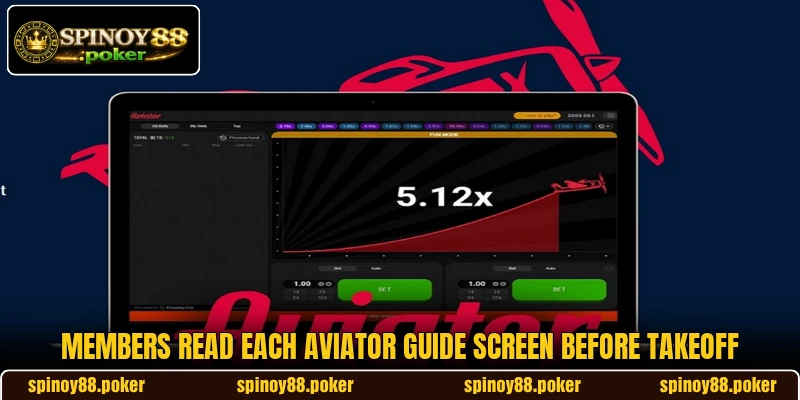
How the flight cycle works in detail
Each round follows a fixed order, but the multiplier result changes each time. Players understand more when the screen sections are read before any stake is placed.
Starting the bet panel
The bet panel opens before the aircraft leaves the runway. Members choose a stake amount, usually shown through clear PHP or USD fields. The entry must be confirmed before the countdown reaches zero.
Small stakes make early testing easier, especially when screens feel unfamiliar. Players can use PHP 20 or USD 1 examples to read value movement. The goal is understanding the panel, not chasing a single round.
After confirmation, the placed stake appears beside the active round. Members should check that the amount matches the intended value. A wrong number can change the whole result shown after cashout.
Reading the multiplier climb
The multiplier rises after takeoff and shows the current return rate. Players see figures such as 1.20x, 1.80x, or 2.50x during movement. The number keeps changing until the round stops.
A higher multiplier can look attractive, but it also brings more exposure. Members who cash out earlier accept a smaller confirmed return. Those waiting longer face the chance of losing that placed stake.
Round history can help readers compare recent flight patterns. It does not control the next result or create a certain signal. A balanced Aviator guide treats history as reference, not prediction.
Aviator guide cashout timing
Cashout is the main action after a stake enters the round. Members press the button when the displayed multiplier matches their chosen point. Once accepted, the screen records the return for that stake.
A focused Aviator guide explains timing as a screen habit. Players should know where the button sits before takeoff starts. This avoids slow reactions when the multiplier climbs faster than expected.
Cashout may fail if the aircraft leaves before the request is accepted. That is why timing matters more than watching only high numbers. Members need to read the live field and button together.
Using the automatic cashout
Automatic cashout lets members set a target before takeoff. The system requests cashout once the multiplier reaches that selected number. This can help when the screen moves quickly.
Players can set values such as 1.50x or 2.00x in advance. The chosen figure should match the stake size and expected round pace. This Aviator guide feature keeps the action clear during fast climbs.
Auto settings still depend on the flight reaching the target. If the round ends earlier, the stake will not return. Members should check every setting before confirming any new entry.

Clear betting choices prior to each takeoff screen
Bet choices feel easier when members know what each screen field means. This Aviator guide section explains room pace, limits, and device display with plain terms.
Choosing room pace clearly
Some rooms move quickly, while others give members more time. Players should choose a pace that matches their reading speed. Fast countdowns can create rushed entries when the panel feels new.
Room pace also affects how often members see active rounds. A slower rhythm gives more space to check stakes and cashout fields. A faster rhythm demands quicker screen reading from every participant.
This Aviator guide point matters because timing starts before takeoff. Members who understand pace can prepare the stake field earlier. Clear preparation reduces mistakes on the next active round.
Checking limits before rounds
Every room has minimum and maximum values for placed stakes. Members may see limits in PHP, USD, or both supported displays. These figures decide whether a chosen amount can enter the round.
A limit check should happen before the countdown becomes urgent. Players who skip this step may see rejected stakes or changed amounts. The screen usually shows messages when values are outside allowed ranges.
This Aviator guide reminder keeps attention on the actual entry field. Members should match the stake to the room rule before pressing confirm. Clear limit reading makes later cashout records easier to understand.
Following device screen carefully
A phone screen can feel tighter than a desktop layout. Members should locate stake fields, cashout buttons, and history boxes before entry. Screen size changes how quickly important details are noticed.
Stable internet also matters because the multiplier moves in real time. Players should avoid switching apps while an active round is running. Delays can hide a cashout request or late screen update.
This Aviator guide detail focuses on clear device reading during takeoff. Members who know the layout can react with fewer screen errors. A clean display makes every confirmed action easier to review.

Conclusion
Aviator guide gives members a plain way to understand flight rounds, cashout timing, room limits, and screen choices. The focus stays on reading each action clearly while using SPINOY88 with PHP or USD displays. Players can register, load the app, enter the game, and may luck be on their side today.